Acronym Glossary
| Acronym | Expanded Form | Meaning |
|---|---|---|
| DDS | Drawing Description Data Structure | The in-memory retained-mode scene graph that holds every drawing object created during a session. |
| DDDS | Drawing Description Data Structure (alternative form) | Interchangeable with DDS – used in early design notes; the shorter form DDS is preferred in code and API names. |
| CHDOP | Class Hierarchy of Drawing Object Primitives | The C++ class/struct hierarchy that represents individual objects stored inside the DDS (points, lines, circles, cameras, UCS frames, 3D solids, etc.). |
| DDJ | Drawing Data JSON | A JSON-format serialisation of the full DDS scene, produced by wxbgi_dds_to_json() and consumed by wxbgi_dds_from_json(). |
| DDY | Drawing Data YAML | A YAML-format serialisation of the full DDS scene, produced by wxbgi_dds_to_yaml() and consumed by wxbgi_dds_from_yaml(). |
These acronyms appear throughout API function names (e.g. wxbgi_dds_*), internal type names, and code comments.
What the DDS Adds
Every call to a BGI drawing function (e.g. line, circle, rectangle) and every world/UCS draw call (e.g. wxbgi_world_line, wxbgi_ucs_circle) automatically appends a CHDOP entry to the DDS while also performing the immediate pixel-buffer render. The DDS therefore always contains a complete, replayable description of the current scene.
Cameras (wxbgi_cam_* / wxbgi_cam2d_*), User Coordinate Systems (wxbgi_ucs_*), world extents, and 3D solid primitives are also stored as CHDOP nodes in the DDS.
Key design choices:
- Collection:
std::unordered_map(O(1) direct access by string ID) combined with astd::vectorinsertion-order index – giving both quick direct access and sequential traversal. - Default scene: A default camera named
"default"and a world UCS named"world"are created automatically oninitwindow()/initgraph(). - Retained-mode render: Call
wxbgi_render_dds(camName)to replay the full scene through any camera. All three panels of the camera demo use this to show the same DDS from different viewpoints simultaneously. - Serialisation: The scene can be exported to DDJ or DDY at any time and re-imported to restore or share it.
Public API Header
Core DDS Functions
Scene Inspection
| Function | Description |
|---|---|
wxbgi_dds_object_count() | Total number of CHDOP objects currently in the DDS. |
wxbgi_dds_get_id_at(index) | String ID of the object at insertion-order position index. |
wxbgi_dds_get_type(id) | Returns a WXBGI_DDS_* type constant (see table below). |
wxbgi_dds_get_coord_space(id) | Coordinate space of the object (BgiPixel, World3D, or UcsLocal). |
wxbgi_dds_get_label(id) | Human-readable label attached to the object. |
wxbgi_dds_set_label(id, label) | Attach or change a label. |
wxbgi_dds_find_by_label(label) | Look up an object ID by its label. |
wxbgi_dds_set_visible(id, visible) | Show / hide an individual object without deleting it. |
wxbgi_dds_get_visible(id) | Returns 1 if visible, 0 if hidden. |
External Metadata
| Function | Description |
|---|---|
wxbgi_dds_set_external_attr(id, key, value) | Set or replace one string-valued external attribute on any DDS object. |
wxbgi_dds_get_external_attr(id, key) | Read one external attribute value. |
wxbgi_dds_clear_external_attr(id, key) | Remove one external attribute key from the object. |
wxbgi_dds_external_attr_count(id) | Number of external attributes stored on the object. |
wxbgi_dds_get_external_attr_key_at(id, index) | Enumerate external-attribute keys by index. |
wxbgi_dds_get_external_attr_value_at(id, index) | Enumerate external-attribute values by index. |
Scene Modification
| Function | Description |
|---|---|
wxbgi_dds_remove(id) | Remove one object by ID. |
wxbgi_dds_clear() | Remove all drawing objects; keeps cameras and UCS frames. |
wxbgi_dds_clear_all() | Remove every object including cameras and UCS frames. |
wxbgi_dds_translate(id, dx, dy, dz) | Create a retained Transform node that references id and replays it with a translation offset. |
wxbgi_dds_rotate_*() | Create retained Transform nodes for X/Y/Z or arbitrary-axis rotation in degrees or radians. |
wxbgi_dds_scale_uniform() / wxbgi_dds_scale_xyz() | Create retained Transform nodes for uniform or per-axis scaling. |
wxbgi_dds_skew() | Create a retained Transform node from six 3D shear factors. |
wxbgi_dds_union(count, ids) | Create a retained SetUnion node over existing DDS object IDs. |
wxbgi_dds_intersection(count, ids) | Create a retained SetIntersection node over existing DDS object IDs. |
wxbgi_dds_difference(count, ids) | Create a retained ordered SetDifference node over existing DDS object IDs. |
wxbgi_object_set_face_color(id, color) | Update the face colour of an existing 3D solid DDS object or retained set-operation node. |
wxbgi_dds_get_child_count(id) | Number of direct child IDs referenced by a Transform / SetUnion / SetIntersection / SetDifference node. |
wxbgi_dds_get_child_at(id, index) | Return one direct child ID from a retained composition node. |
Retained-Mode Rendering
| Function | Description |
|---|---|
wxbgi_render_dds(camName) | Traverse the full DDS and render every visible object through the named camera into the active BGI pixel buffer. Pass NULL to use the active camera. |
Serialisation – DDJ (JSON)
| Function | Description |
|---|---|
wxbgi_dds_to_json() | Serialise scene to a DDJ string (valid until next serialisation call). |
wxbgi_dds_from_json(jsonString) | Deserialise a DDJ string into the DDS. Returns 0 on success. |
wxbgi_dds_save_json(filePath) | Save DDJ to a file. Returns 0 on success. |
wxbgi_dds_load_json(filePath) | Load DDJ from a file. Returns 0 on success. |
Serialisation – DDY (YAML)
| Function | Description |
|---|---|
wxbgi_dds_to_yaml() | Serialise scene to a DDY string (valid until next serialisation call). |
wxbgi_dds_from_yaml(yamlString) | Deserialise a DDY string into the DDS. Returns 0 on success. |
wxbgi_dds_save_yaml(filePath) | Save DDY to a file. Returns 0 on success. |
wxbgi_dds_load_yaml(filePath) | Load DDY from a file. Returns 0 on success. |
CHDOP Object Type Constants (<tt>WXBGI_DDS_*</tt>)
The following constants identify the concrete CHDOP sub-type of each DDS entry:
| Constant | Value | Description |
|---|---|---|
WXBGI_DDS_CAMERA | 0 | Camera (2D or 3D) |
WXBGI_DDS_UCS | 1 | User Coordinate System frame |
WXBGI_DDS_WORLD_EXTENTS | 2 | World bounding extents |
WXBGI_DDS_POINT | 3 | putpixel / point |
WXBGI_DDS_LINE | 4 | line / lineto / linerel |
WXBGI_DDS_CIRCLE | 5 | circle |
WXBGI_DDS_ARC | 6 | arc |
WXBGI_DDS_ELLIPSE | 7 | ellipse |
WXBGI_DDS_FILL_ELLIPSE | 8 | fillellipse |
WXBGI_DDS_PIE_SLICE | 9 | pieslice |
WXBGI_DDS_SECTOR | 10 | sector |
WXBGI_DDS_RECTANGLE | 11 | rectangle |
WXBGI_DDS_BAR | 12 | bar |
WXBGI_DDS_BAR3D | 13 | bar3d |
WXBGI_DDS_POLYGON | 14 | drawpoly |
WXBGI_DDS_FILL_POLY | 15 | fillpoly |
WXBGI_DDS_TEXT | 16 | outtextxy / outtext |
WXBGI_DDS_IMAGE | 17 | putimage |
WXBGI_DDS_BOX | 18 | wxbgi_solid_box (3D solid) |
WXBGI_DDS_SPHERE | 19 | wxbgi_solid_sphere (3D solid) |
WXBGI_DDS_CYLINDER | 20 | wxbgi_solid_cylinder (3D solid) |
WXBGI_DDS_CONE | 21 | wxbgi_solid_cone (3D solid) |
WXBGI_DDS_TORUS | 22 | wxbgi_solid_torus (3D solid) |
WXBGI_DDS_HEIGHTMAP | 23 | wxbgi_surface_heightmap (surface) |
WXBGI_DDS_PARAM_SURFACE | 24 | wxbgi_surface_parametric (surface) |
WXBGI_DDS_EXTRUSION | 25 | wxbgi_extrude_polygon (extrusion) |
WXBGI_DDS_TRANSFORM | 26 | Retained affine-transform wrapper used by translate, rotate, scale, and skew helpers |
WXBGI_DDS_SET_UNION | 27 | Retained set-operation node performing a union over referenced DDS objects |
WXBGI_DDS_SET_INTERSECTION | 28 | Retained set-operation node performing an intersection over referenced DDS objects |
WXBGI_DDS_SET_DIFFERENCE | 29 | Retained set-operation node performing ordered subtraction over referenced DDS objects |
Retained Composition Nodes
The DDS/CHDOP graph now supports a small retained composition layer on top of leaf primitives:
- Transform nodes reference one or more child IDs and carry a 4x4 affine matrix. Public helpers include translate, rotate, scale, and skew wrappers.
- SetUnion, SetIntersection, and SetDifference nodes reference existing DDS object IDs and render them as a single composed result.
- SetDifference is ordered: operand 0 is the base, operands 1..N are subtracted from it in sequence.
- For supported 3D solid DDS leaves (
Box,Sphere,Cylinder,Cone,Torus,HeightMap,ParamSurface,Extrusion), retained union, intersection, and difference are currently evaluated via the exact Manifold-based boolean path before rendering.
These nodes are first-class DDS entries: they have their own IDs, participate in JSON/YAML serialisation, can be hidden or labelled, and can themselves be referenced by later composition nodes.
The exact retained boolean backend stays on Manifold in this library. Supported 3D solids are converted into closed volumes before boolean evaluation, and the resulting mesh is cached per DDS scene revision for efficient redraws.
Current status
- Public affine helpers today: translate, rotate, scale, and skew
- Public retained set operations today: union, intersection, difference
- Render ownership is enforced by DDS traversal: an object referenced by a
Transform,SetUnion,SetIntersection, orSetDifferenceis skipped as a standalone render root and is expected to appear through its owning composed node - Supported 3D solids use the exact Manifold boolean path; unsupported analytic cases fall back to closed triangle meshes before boolean evaluation
wxbgi_dds_set_solid_draw_mode(...)propagates draw-mode changes to both leaf solids and retained set-operation nodes- Full retained transform chains now accumulate the entire 4x4 matrix during replay and exact 3D boolean evaluation; translation is no longer a special-case fast path only
High-level implementation design
- Leaf primitives are stored in
DdsScene::index/orderlike any other DDS object. TransformandSet*nodes store only referenced child IDs plus node-local state (style, matrix, draw mode, labels, visibility).DdsScene::forEachRenderRoot()computes which IDs are referenced by composition nodes and suppresses those IDs as top-level roots duringwxbgi_render_dds(...).renderNodeRecursive(...)traverses from each render root. Leaf objects render directly; transform nodes post-multiply their local matrix into the accumulated chain; set-operation nodes evaluate or mask-combine their operands.- For supported 3D solids,
renderExactSetOperation3D(...)evaluates a closed-volume Manifold result, caches the generated triangles per DDS scene revision, and replays that cached mesh on later frames.
Safe usage note for DDS IDs
Getter functions such as wxbgi_dds_get_id_at(...) return borrowed const char * buffers. In C++ code, copy them immediately:
That avoids later DDS API calls overwriting the buffer before you build a transform or set-operation node.
Retained composition example
DDS External Attributes
Each DDS object now carries a generic externalAttributes string map. This is intended for workflows that need to attach extra semantic information without changing the core geometry model. The first consumer is the OpenLB bridge, but the storage is deliberately generic.
Typical OpenLB-facing keys include:
| Key | Meaning |
|---|---|
openlb.role | semantic role such as fluid, solid, or boundary |
openlb.material | explicit material id stored as a string |
openlb.boundary | boundary classification such as wall or inlet |
openlb.priority | overlap tie-breaker for classification |
openlb.enabled | on-off export flag |
These attributes round-trip through both DDJ and DDY serialisation.
DDS as OpenLB Geometry Source
The retained DDS scene is now also used as the geometry source for an OpenLB-oriented material-classification bridge. This is a geometry query layer, not a solver ABI.
Current exported helpers live in src/wx_bgi_openlb.h:
wxbgi_openlb_classify_point_material(...)wxbgi_openlb_sample_materials_2d(...)
Current supported retained subset:
- box
- sphere
- cylinder
- cone
- torus
- transform chains
- set-union, set-intersection, and set-difference nodes
Unsupported DDS object types are currently treated as not contributing solver occupancy. This keeps the bridge explicit and predictable while the supported subset grows.
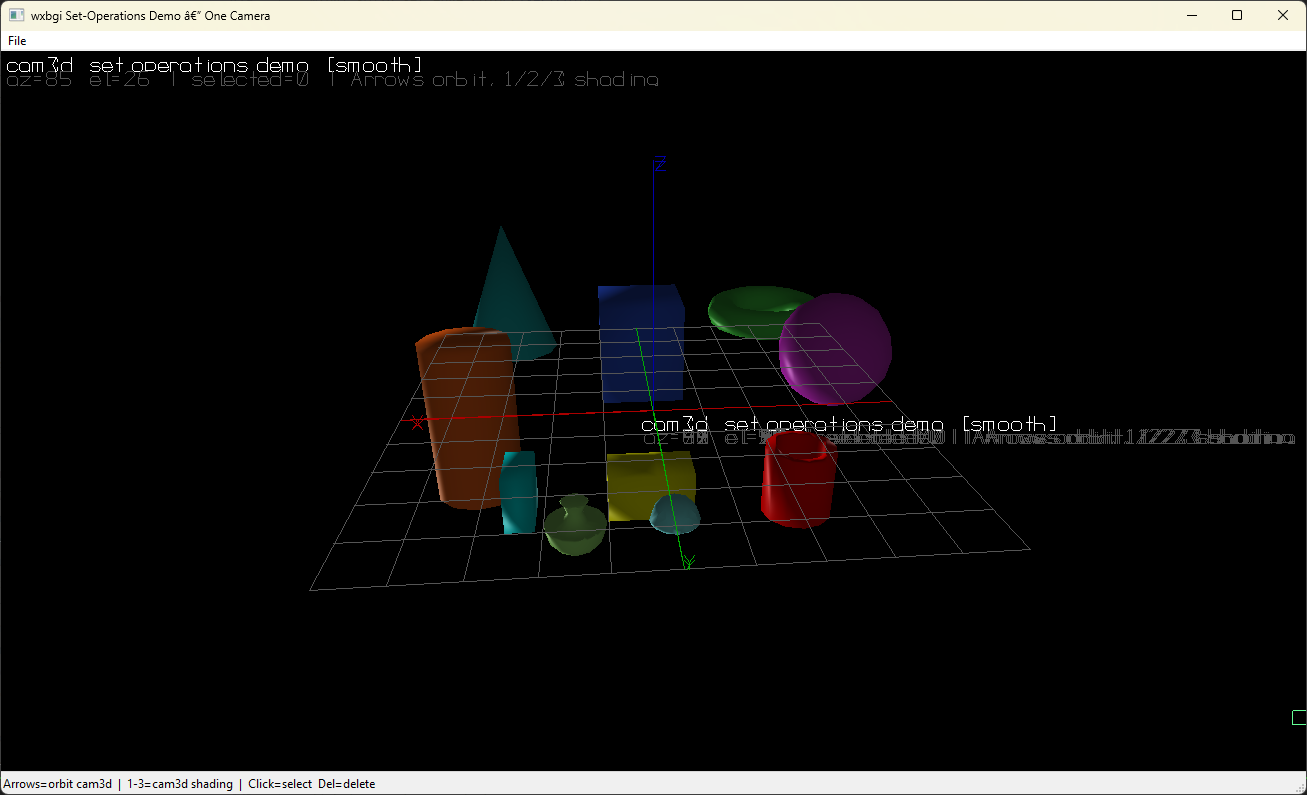
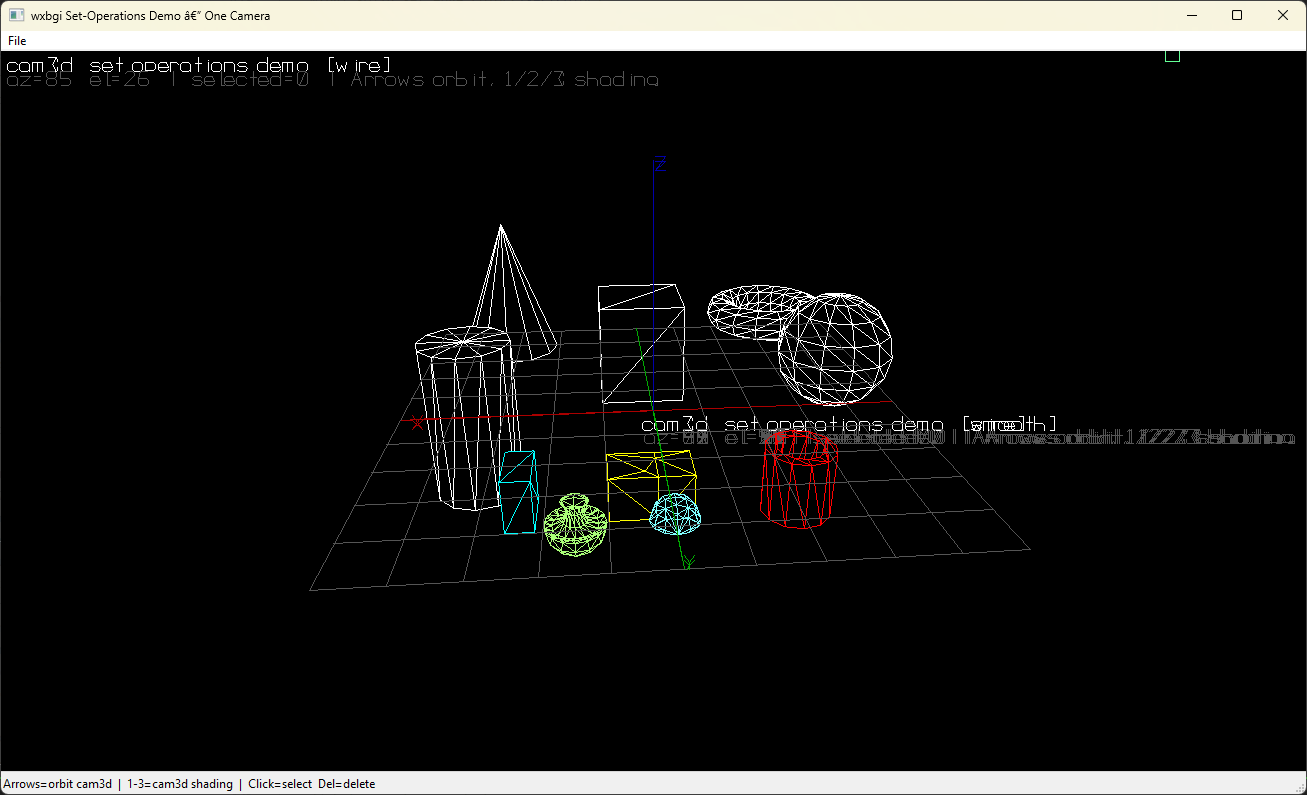
Compound-solid reference images
Minimal DDS Usage Example
GL Rendering Pipeline (wx Mode)
When using wx_bgi_wx, the BGI pixel buffer is composited to the screen via an OpenGL texture quad pass rather than the legacy per-pixel GL_POINTS path. The modern path is selected automatically when the driver supports OpenGL 3.3 (virtually all hardware since 2010). On older drivers the library falls back silently to the legacy path.
Explicit GL Cleanup
When the application destroys its wxGLContext, call wxbgi_gl_pass_destroy() with the context still current to release all internal GL objects (textures, VAOs, shader programs). Omitting this can cause GPU driver crashes during process shutdown on some Windows configurations.
The WxBgiCanvas destructor handles this automatically, so user code only needs this call when managing a custom wxGLContext lifecycle:
Diagnostic: Legacy GL Fallback
Force the legacy GL_POINTS rendering path at runtime (useful for comparing output or isolating GL driver issues):
3D Solid Shading Modes and Lighting API
3D solid primitives support three draw modes and a GPU Phong-style lighting model.
Draw Mode Constants
| Constant | Value | Description |
|---|---|---|
WXBGI_SOLID_WIREFRAME | 0 | Edges only; current line colour; software painter's algorithm |
WXBGI_SOLID_SOLID | 1 | Backward-compat alias for WXBGI_SOLID_FLAT |
WXBGI_SOLID_FLAT | 1 | GL Phong flat shading with GPU depth buffer — per-face normals, sharp silhouette |
WXBGI_SOLID_SMOOTH | 2 | GL Phong smooth (Gouraud) shading — per-vertex normals averaged from adjacent faces |
WXBGI_SOLID_FLAT and WXBGI_SOLID_SMOOTH use the full GPU pipeline:
- Triangle data is tessellated in world-space and collected into a
PendingGlRenderbuffer. wxbgi_render_dds()/wxbgi_wx_render_page_gl()submits the buffer to the GPU as a VBO.- Layer 0: 2D page buffer uploaded as an RGBA texture (fullscreen quad).
- Layer 1: Solid triangles drawn with GLSL Phong shading +
GL_DEPTH_TEST. - Layer 2: World-space line segments drawn depth-tested (if any present).
- Wireframe solids fall back to the software painter's algorithm (fast, no depth buffer).
Lighting API (<tt>wx_bgi_dds.h</tt>)
These functions configure the Phong lighting model used when WXBGI_SOLID_FLAT or WXBGI_SOLID_SMOOTH is active. Parameters are stored in BgiState::lightState and applied each frame by the GPU solid render pass.
| Function | Description |
|---|---|
wxbgi_solid_set_light_dir(x, y, z) | Primary (key) light direction vector (will be normalised). |
wxbgi_solid_set_light_space(worldSpace) | 1 = light direction in world space; 0 = view/eye space. |
wxbgi_solid_set_fill_light(x, y, z, strength) | Secondary fill light direction + intensity scalar. |
wxbgi_solid_set_ambient(a) | Ambient light intensity [0..1]. |
wxbgi_solid_set_diffuse(d) | Diffuse reflection coefficient [0..1]. |
wxbgi_solid_set_specular(s, shininess) | Specular intensity and Phong shininess exponent. |
wxbgi_set_legacy_gl_render(enable) | 1 = revert to the old per-pixel GL_POINTS path (diagnostics only). |
Default lighting:
- Key light:
(-0.577, 0.577, 0.577)world-space (upper-left-front). - Fill light:
(0, -1, 0)at strength0.3. - Ambient
0.2, diffuse0.7, specular0.3/ shininess32.
Smooth-Shading Vertex Normal Algorithm
WXBGI_SOLID_SMOOTH computes per-vertex normals using an accumulate-and-normalise approach over the tessellated triangle list:
- Compute the face normal for every triangle.
- For each vertex, sum the face normals of all triangles that share that position (quantised to 1/1000-world-unit grid to handle float precision).
- Normalise each accumulated normal.
This produces smooth curvature on spheres and cylinders while preserving hard edges on box corners where the shared-vertex map has no neighbours.
Multi-Scene Management (CHDOP Graph Registry)
Overview
The library maintains a registry of named DDS / CHDOP graphs. Each graph is an independent retained-mode scene. A scene named "default" always exists and cannot be destroyed — backward-compatible code that never calls any wxbgi_dds_scene_* function continues to work exactly as before.
Two Key Relationships
1 Scene → Many Cameras
Multiple cameras can be assigned to the same scene graph. All of them will render the same set of objects from their own viewpoint:
This is the primary use-case for split-view CAD / engineering visualisations.
1 Camera → 1 Scene (exclusive)
Each camera is assigned to exactly one scene at a time. Changing the assignment with wxbgi_cam_set_scene() is immediate — the next wxbgi_render_dds(camName) call uses the new scene. If the previously assigned scene is destroyed, the camera automatically falls back to "default".
Scene Management API (<tt>wx_bgi_dds.h</tt>)
| Function | Returns | Description |
|---|---|---|
wxbgi_dds_scene_create(name) | int 0=ok / -1 | Create a new named scene. No-op if name already exists. |
wxbgi_dds_scene_destroy(name) | void | Destroy a named scene; cameras assigned to it fall back to "default". No-op on "default". |
wxbgi_dds_scene_set_active(name) | void | Route all subsequent immediate-mode draw calls to this scene. |
wxbgi_dds_scene_get_active() | const char * | Return the name of the currently active scene. |
wxbgi_dds_scene_exists(name) | int 1=yes / 0 | Test whether a named scene exists in the registry. |
wxbgi_dds_scene_clear(name) | void | Remove all drawing objects from the named scene; cameras and UCS in that scene are kept. |
wxbgi_dds_scene_clear_active() | void | Same as above for the currently active scene. |
Camera-to-Scene Assignment API (<tt>wx_bgi_dds.h</tt>)
| Function | Returns | Description |
|---|---|---|
wxbgi_cam_set_scene(camName, sceneName) | void | Assign a camera to a named scene. Pass NULL as camName for the active camera. |
wxbgi_cam_get_scene(camName) | const char * | Return the scene name currently assigned to camName. |
Per-Camera Shading Modes
When multiple cameras share a scene you will often want different shading per camera (e.g. camera A in Smooth, camera B in Wireframe). Call wxbgi_dds_set_solid_draw_mode() immediately before each wxbgi_render_dds() call to apply a per-camera draw mode without permanently changing the DDS:
Multi-Scene Usage Example
Serialisation Notes
DDJ/DDY files produced by wxbgi_dds_save_json() and wxbgi_dds_save_yaml() now include a "scenes" top-level key that lists every named scene graph, and each camera node carries a "scene" field recording its assignedSceneName.
Backward compatibility: Old DDJ/DDY files that do not have a "scenes" key load cleanly — all objects are placed into the "default" scene and all cameras are assigned to "default".